The Sims 2 Installation Guide for Windows 10 and 11
So you came all the way here to read this tutorial about an old game released from 2004? Don't worry, I got ya! I will explain step by step on how to install The Sims 2 on Windows 10 or 11.
🛠️ Prerequisites
💻 System Requirements
- A 2.5Ghz+ Processor
- A 128MB+ video card (integrated will work too)
- 4GB+ of RAM
- Windows 10+ (at this moment, I only support 64-bit system)
- 15 GB available space on HDD or SSD
🎮 If you have ever played the game before..
Backup your existing save files if you don’t want to lose your game progress, see Uninstall Instruction from MTS. Be careful that the save games from previous installation may or may not be compatible with the new installation of TS2.
⚠️ Important disclaimer
This tutorial is designed to work with The Sims 2 Starter Pack AND also EA re-release on Steam. This tutorial won't work with setup that are based on the old retail disc version. However, you can directly skip to section After Installation for stabilizing the gameplay on your system.
📥 Installation guide
📁 Install game files
We will get the setup files on our own computer. I chose to use -osab The Sims 2 Starter Pack_ setup, because it have all the expansions + stuff packs (including IKEA Home Stuff), while also having the least file size (7.7 GB).
Extract the zip file that you just download to anywhere you want, but after you extract it, rename the folder to “The Sims 2 Ultimate Collection” (without the quotes).
⚙️ Install registry
The purpose of this installer is to register the downloaded Sims 2 file to the system and also activate the game.
⬇️ TS2 Standalone Installer 64-bit.
Once you've downloaded it, open the setup and select the right folder when you've told to do it. For me, because I extracted the game files on a folder in D:/Programs, it'll look like this:

Press Next. On the screen where there's a bunch of checkbox regarding what you want to install, don't change anything. Just press install and wait for it to done. Once done, do not launch the game yet! Be patient, and continue reading this tutorial.
⌛️ Post-installation steps
📐 Graphics Rules Maker
This app will make The Sims 2 recognize your graphics card properly, so the game can know the GPU is able to run TS2 and give you the best images quality and effects in the game. It's already installed on your computer, so just open it from start menu or Windows search.
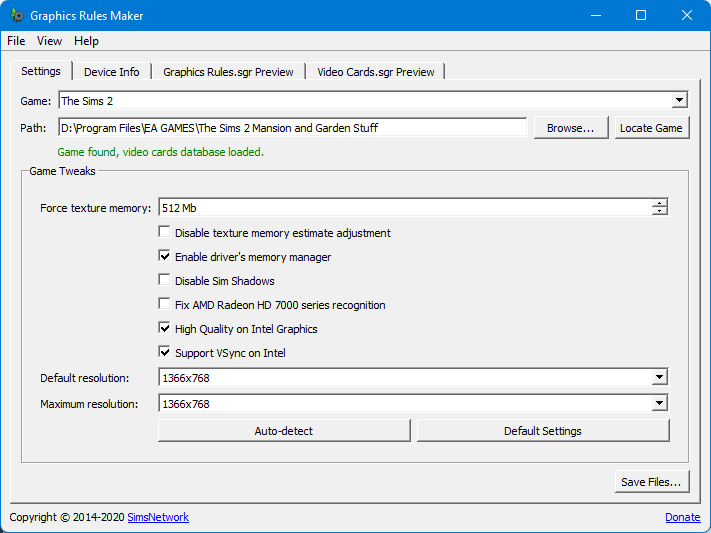
Press ‘locate game’ button on the upper right screen. Now click ‘Auto-detect’ button. Press OK when asked. Now you’ll see that some options have changed, make sure the amount of ‘Force texture memory’ is the same as your card VRAM.
Attention: -If you have VRAM more than 2GB, set it to 2048, else the game will crash! -If you have Intel HD/UHD (integrated) graphics, set it to 256 if you have 4 GB RAM or 512 if you have 8 GB RAM or more.
After ensuring that the option is correct, press ‘Save Files…’. When asked, click Yes/OK. Then close the app. Now run the game, and enjoy the performance boost! You may want to set all of the in-game graphics quality to high (unless you’re on integrated graphics, it is best to leave it on low).
⚙️ Sims2RPC Launcher
Sims2RPC is a launcher created by the wonderful LazyDuchess. It made launching Sims 2 a breeze. Anyway, I recommended some settings that you could set through their settings. Open it from start menu or Windows search by typing "Sims2RPC Settings".
Inside it, you can set some settings to your choice. This is the settings that I use myself:

Once you're done, press Save Settings and close the program. You can read Sims2RPC official page on MTS for more info.
🥇 Opening the game for the 1st time
Open the game, and get into one of the default neighborhood. Doesn’t matter which one. And then, get into settings, and choose the screen settings. You can increase the quality of graphics there. Also, if you want to enable shadow, go into a random lot and then set it from there.
👥 Fix the shadows
Now, if you set shadow on high option, there will be black square shadows under sims. You can fix it by installing Sim Shadow Fix mod from MTS. Don't know how to install it? There is a guide to install mods on my blog.
❗️ Install essential mods
Install essential mods for flawless gameplay.
😆 Epilogue
Congratulations! Now you have a working TS2 installation! Have fun with the game, and that's it, thanks for reading this post. Give a like (the up arrow button) if you like this tutorial.
🤔 I have another question, how to ask it?
You could open my guestbook (its at the left/top side of the blog) and ask your questions there. Or, you can send me an email or sending DM on my Discord Disil07#1481. I'll try to help you to fix the problem and it's free, so why not :)
Post Changelog
04 December 2025
Added info regarding the new Sims 2 Legacy Collection on Steam.
20 April 2025
Initial release.
Disil's Stuff is licensed under CC BY 4.0
